Point Properties
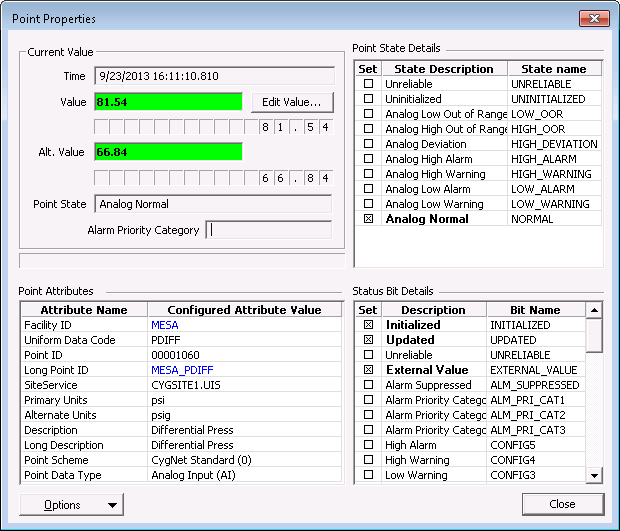
The Point Properties option on the Current Values context menu opens the Point Properties dialog box for the relevant point. The dialog box is common to all current value services (CVS). It provides a set of point and current value details and options, including alarm state and access to the point configuration data. See Points for more information about point records in CygNet Software.
|
Point Properties |
Point Properties Buttons
The Point Properties dialog box provides quick access to other information for the selected point.
| Property | Description |
|---|---|
|
Edit Value… |
Manually change the point's current value. See Edit Point Value. |
Options

|
|
|
Point Configuration |
Opens the point properties editor for this point. See PNT Editor. |
|
Facility Configuration |
Opens the facility editor for this point. See FAC Editor. |
|
Alarm History |
Access the Alarm History dialog for the point's alarm information. See Alarm History. |
|
Value History |
Enables you to access current value information. See History Records, Viewing History Records Graphically, and Modifying History Data. |
|
Set Point Audits |
Enables you to access set point audit information. See Auditing. |
|
Point Configuration Audits |
Enables you to access point configuration audit information. See Auditing. |
Point Properties Fields
The following table lists and describes Point Properties fields.
| Property | Description |
|---|---|
|
Current Value |
This group of values provides details on the current value and its state. |
|
Point Attributes |
This group of attributes displays configured attributes for the point. Hyperlinks on the Facility ID and Long Point ID allow you to view and edit the facility properties and point configuration record respectively. |
|
Point State Details |
This group of attributes displays point state settings. See Alarm Types and Properties and Point State and Alarm Condition. |
|
Status Bit Details |
This group of attributes displays status bit details. See Point State and Status Bit Details. |


